Install the app
How to install the app on iOS
Follow along with the video below to see how to install our site as a web app on your home screen.
Notera: This feature may not be available in some browsers.
Du använder en lite för gammal webbläsare, du bör uppdatera den.
Problem med Adobe lightroom LrC
- Trådstartare weru
- Start datum
Erik Schalin
Aktiv medlem
ä lockfilen kvar?
Skall finnas när LRC startas o sen raderas när LRC stängs ner.
Skall finnas när LRC startas o sen raderas när LRC stängs ner.
weru
Aktiv medlem
Jag har tagit bort lockfilenä lockfilen kvar?
Skall finnas när LRC startas o sen raderas när LRC stängs ner.
A I Nikolis
Aktiv medlem
Inte så att den har installerat en ny version, t.ex från 2025 till 2026, och det är ikonen för gamla versionen som ligger kvar?
Oavsett vad så kan vi inte direkt komma någon vart utan att ens veta vilket operativsystem det gäller
Oavsett vad så kan vi inte direkt komma någon vart utan att ens veta vilket operativsystem det gäller
weru
Aktiv medlem
Windows 11Inte så att den har installerat en ny version, t.ex från 2025 till 2026, och det är ikonen för gamla versionen som ligger kvar?
Oavsett vad så kan vi inte direkt komma någon vart utan att ens veta vilket operativsystem det gäller
Jonas gbg
Aktiv medlem
Jag använder inte Lightroom men känner igen problemet lite vagt. En snabb sökning och frågan är om du gått igenom stegen som beskrivs här:
--------------------------------------------------------------------------------------------------
In a first step try to reset the preferences to the default settings by doing the following steps:
It's recommended to backup your preferences before you reset the preferences to the default settings:
https://helpx.adobe.com/lightroom-classic/kb/preference-file-and-other-file-locations.html
If this doesn't help try to restore a catalog from the recent backup or try to create a new catalog. Hold the Ctrl-Key while starting LrC. This opens a catalog selection dialog. Create a new one and see if this catalog then works. You could then try to import your current catalog into the new one.
--------------------------------------------------------------------------------------------------
?
--------------------------------------------------------------------------------------------------
In a first step try to reset the preferences to the default settings by doing the following steps:
- Close Lightroom.
- Windows: Hold down [Alt]+[Shift] while restarting Lightroom.
- Overwrite the Preferences when prompted by the dialog.
- Close Lightroom.
- Restart Lightroom.
It's recommended to backup your preferences before you reset the preferences to the default settings:
https://helpx.adobe.com/lightroom-classic/kb/preference-file-and-other-file-locations.html
If this doesn't help try to restore a catalog from the recent backup or try to create a new catalog. Hold the Ctrl-Key while starting LrC. This opens a catalog selection dialog. Create a new one and see if this catalog then works. You could then try to import your current catalog into the new one.
--------------------------------------------------------------------------------------------------
?
HasseFor
Aktiv medlem
Hej, liknande har hänt mig med nya versioner av Photoshop och då är det ikonen som länkar till en äldre version.
Prova att gå in i Adobe/Lightroom-mappen under program och leta reda på exe-filen (Lightroom-ikonen) om LR då öppnas så kopiera ikonen och ersätt den gamla med den nya ikonen, på platsen där du normalt öppnar LR.
Om du startar LR genom att dubbelklicka på en bildfil så välj istället högerklick, öppna med, och leta reda på den aktuella exe-filen/ikonen och klicka på den. Då borde Windows komma ihåg rätt sökväg/adress även nästa gång du öppnar en fil.
Prova att gå in i Adobe/Lightroom-mappen under program och leta reda på exe-filen (Lightroom-ikonen) om LR då öppnas så kopiera ikonen och ersätt den gamla med den nya ikonen, på platsen där du normalt öppnar LR.
Om du startar LR genom att dubbelklicka på en bildfil så välj istället högerklick, öppna med, och leta reda på den aktuella exe-filen/ikonen och klicka på den. Då borde Windows komma ihåg rätt sökväg/adress även nästa gång du öppnar en fil.
Pär Plåtare
Aktiv medlem
Jag hade ett liknande problem.
Efter att tjatat med Adobes chatbot en längre stund fick jag kontakt med supporten i form av en person med indisktlingande namn i en chat. Denne vill ha access till min dator vilket jag gav efter stunds tvekan medgav.
Datorns språk ändrades till engelska liksom keyboard.
LRC avinstallerades och återinstallerades ett flertal ggr. Drivrutiner m.m uppdaterades.
Ännu en person dök upp med ett kvinnligt indiskt namn.
Efter flera timmars stökande så fick de en äldre version av LRC att fungera. Jag uppmanades att inte uppdatera till senare versioner.
Jag hävdade då att jag betalar varje månad och därför vill ha den senaste versionen.
De sa då att de skulle eskalera ärendet. Jag frågade efter ett reference nummer vilket jag fick. Efter några dagar och lite letande hittade jag Adobes supportsida. Skickade då och där en fråga om vad som händer med mitt ärende.
Efter ett par dagars strul med gamla telnummer så ringer en person med telnr från Californien upp.
Vi pratar över telefon.
Även denna person vill ha datoraccess vilket jag ger. Han verkar jobba hemifrån eftersom jag hör hundar skälla, barn skrika och kvinnor gräla i bakgrunden.
Åter diverse av och på installationer, drivrutinsuppdateringar m.m.
Mitt under processen så försöker supportpersonen sälja på mig ett AI paket. " A very special time limited offer". Lite oklart vad det skulle innehålla men i stort sett alla AI tjänster jag känner till rabblades upp. Oklart vad kostnaden skulle vara. Jag avböjer vänligt men bestämt.
Efter ett par timmar har den senaste personen fått det att fungera. Lite oklart för mig vad som skapade problemet. En orsak de pekade på var att jag lagt Lrcatiflen i en Dropbox mapp. Det har jag haft I flera år så jag har lite svårt hur det kan påverka.
Sammanfattningsvis så fungerar det nu. Min dator och flera program har blivit svengelsk så jag får passa mig när jag har ett engelskt tangentbord.
En något märklig, många timmar lång upplevelse av Adobes support.
Efter att tjatat med Adobes chatbot en längre stund fick jag kontakt med supporten i form av en person med indisktlingande namn i en chat. Denne vill ha access till min dator vilket jag gav efter stunds tvekan medgav.
Datorns språk ändrades till engelska liksom keyboard.
LRC avinstallerades och återinstallerades ett flertal ggr. Drivrutiner m.m uppdaterades.
Ännu en person dök upp med ett kvinnligt indiskt namn.
Efter flera timmars stökande så fick de en äldre version av LRC att fungera. Jag uppmanades att inte uppdatera till senare versioner.
Jag hävdade då att jag betalar varje månad och därför vill ha den senaste versionen.
De sa då att de skulle eskalera ärendet. Jag frågade efter ett reference nummer vilket jag fick. Efter några dagar och lite letande hittade jag Adobes supportsida. Skickade då och där en fråga om vad som händer med mitt ärende.
Efter ett par dagars strul med gamla telnummer så ringer en person med telnr från Californien upp.
Vi pratar över telefon.
Även denna person vill ha datoraccess vilket jag ger. Han verkar jobba hemifrån eftersom jag hör hundar skälla, barn skrika och kvinnor gräla i bakgrunden.
Åter diverse av och på installationer, drivrutinsuppdateringar m.m.
Mitt under processen så försöker supportpersonen sälja på mig ett AI paket. " A very special time limited offer". Lite oklart vad det skulle innehålla men i stort sett alla AI tjänster jag känner till rabblades upp. Oklart vad kostnaden skulle vara. Jag avböjer vänligt men bestämt.
Efter ett par timmar har den senaste personen fått det att fungera. Lite oklart för mig vad som skapade problemet. En orsak de pekade på var att jag lagt Lrcatiflen i en Dropbox mapp. Det har jag haft I flera år så jag har lite svårt hur det kan påverka.
Sammanfattningsvis så fungerar det nu. Min dator och flera program har blivit svengelsk så jag får passa mig när jag har ett engelskt tangentbord.
En något märklig, många timmar lång upplevelse av Adobes support.
Erik Schalin
Aktiv medlem
Pär, du kan byta mellan svenskt o engelskt tangentbord med shift + semikolon OM jag kommer ihåg rätt.
Kan inte prova just nu.
Kan inte prova just nu.
jpgrahn
Aktiv medlem
På senaste tiden har jag noterat att om jag stänger LRC utan att ta backup så går det inte att sedan starta om Lightroom.
Gå in i Taskmanager och leta upp processen som heter Adobe Lightroom Classic (eller något liknande, sitter på jobbet och jag minns inte exakt vad den heter). Döda processen, då kan man starta Lightroom igen.
Alternativt starta om datorn.
Tar jag backup så kan jag starta om Lightroom utan problem.
Letat men inte sett att det är ett vanligt problem. Kanske beror på min dator.
Gå in i Taskmanager och leta upp processen som heter Adobe Lightroom Classic (eller något liknande, sitter på jobbet och jag minns inte exakt vad den heter). Döda processen, då kan man starta Lightroom igen.
Alternativt starta om datorn.
Tar jag backup så kan jag starta om Lightroom utan problem.
Letat men inte sett att det är ett vanligt problem. Kanske beror på min dator.
HasseFor
Aktiv medlem
Hej, har du kollat under Inställningar/preferenser vilka inställningar du har för backup-tagning? Går att välja hur ofta LR ska fråga om du vill köra backup, en gång/vecka t ex.På senaste tiden har jag noterat att om jag stänger LRC utan att ta backup så går det inte att sedan starta om Lightroom.
Gå in i Taskmanager och leta upp processen som heter Adobe Lightroom Classic (eller något liknande, sitter på jobbet och jag minns inte exakt vad den heter). Döda processen, då kan man starta Lightroom igen.
Alternativt starta om datorn.
Tar jag backup så kan jag starta om Lightroom utan problem.
Letat men inte sett att det är ett vanligt problem. Kanske beror på min dator.
weru
Aktiv medlem
Tack alla ni som har kommit med olika förslag hur man kan lösa problemet är ju att det inte går öppna LRC. Idag har jag haft en data tekniker som har varit inne i Adobe Creative Cloud och vänt ut och in på hela LRC. Data killen kan inte göra mer, det här är Adobe och Windows 11 problem att lösa. Det är bara att bita i det sura äpplet. // Rune
Jonas gbg
Aktiv medlem
Det där låter både eländigt och konstigt.
Du är antagligen trött på förslag men du har inte heller svarat på om du försökt med de steg som föreslagits. Så, har du provat att ta bort preferences (inlägg 7 ovan)? Har du provat att ta bort allting Adobe med hjälp av Creative cloud cleaner tool?
Om det inte fungerar så hoppas jag du har en backup av ditt system från tiden då Lightroom fungerade. Se till att du har din katalog säkert förvarad någonstans, dra tillbaka backupen och lägg dit din Lightroomkatalog.
Förmodligen har redan gått igenom detta, jag skriver mest för säkerhets skull.
Vad består det sura äpplet av?
Du är antagligen trött på förslag men du har inte heller svarat på om du försökt med de steg som föreslagits. Så, har du provat att ta bort preferences (inlägg 7 ovan)? Har du provat att ta bort allting Adobe med hjälp av Creative cloud cleaner tool?
Om det inte fungerar så hoppas jag du har en backup av ditt system från tiden då Lightroom fungerade. Se till att du har din katalog säkert förvarad någonstans, dra tillbaka backupen och lägg dit din Lightroomkatalog.
Förmodligen har redan gått igenom detta, jag skriver mest för säkerhets skull.
Vad består det sura äpplet av?
jpgrahn
Aktiv medlem
Min inställning är att jag får en fråga varje gång jag ska stänga Lightroom om jag vill ta en backup. Väljer jag att ta backup så går allt bra, Lightroom fixar backup och stänger sedan snyggt och prydligt. Problemet uppstår om jag väljer att inte ta backup utan Lightroom stänger ner direkt. Då kan man inte starta Lightroom på nytt utan att boota om datorn. Alternativt gå in och ta bort den process som ligger och blockerar.Hej, har du kollat under Inställningar/preferenser vilka inställningar du har för backup-tagning? Går att välja hur ofta LR ska fråga om du vill köra backup, en gång/vecka t ex.
Det här är ett relativt nytt problem men har funnits sedan en, eller kanske två, uppdateringar av Lightroom. Ingen stor grej, jag vet ju hur man fixar det men smått irriterande. Sökt men inte hittat andra som har detta problem.
Att jag ibland vill hoppa över backup beror på att jag kanske bara letat efter någon bild och att jag inte gjort några redigeringar eller sållat bort bilder. Databasen är oförändrad. Då vill jag stänga utan att ta backup.
weru
Aktiv medlem
Allt som du skrev om har vi redan gjort fungerar inte.På senaste tiden har jag noterat att om jag stänger LRC utan att ta backup så går det inte att sedan starta om Lightroom.
Gå in i Taskmanager och leta upp processen som heter Adobe Lightroom Classic (eller något liknande, sitter på jobbet och jag minns inte exakt vad den heter). Döda processen, då kan man starta Lightroom igen.
Alternativt starta om datorn.
Tar jag backup så kan jag starta om Lightroom utan problem.
Letat men inte sett att det är ett vanligt problem. Kanske beror på min dator.
thommya
Aktiv medlem
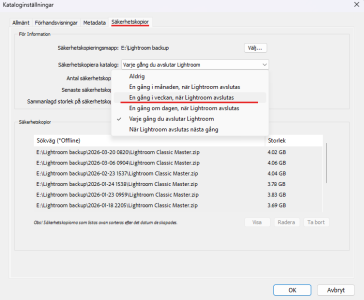
Har du provat att ändra så att du bara får frågan t ex. en gång i veckan eller aldrig och gör det manuellt? Den kanske hamnar i ett udda läge vid just backupdialogen.Min inställning är att jag får en fråga varje gång jag ska stänga Lightroom om jag vill ta en backup. Väljer jag att ta backup så går allt bra, Lightroom fixar backup och stänger sedan snyggt och prydligt. Problemet uppstår om jag väljer att inte ta backup utan Lightroom stänger ner direkt. Då kan man inte starta Lightroom på nytt utan att boota om datorn. Alternativt gå in och ta bort den process som ligger och blockerar.
Det här är ett relativt nytt problem men har funnits sedan en, eller kanske två, uppdateringar av Lightroom. Ingen stor grej, jag vet ju hur man fixar det men smått irriterande. Sökt men inte hittat andra som har detta problem.
Att jag ibland vill hoppa över backup beror på att jag kanske bara letat efter någon bild och att jag inte gjort några redigeringar eller sållat bort bilder. Databasen är oförändrad. Då vill jag stänga utan att ta backup.
Du hittar inställningen under Redigera > Kataloginställningar > Säkerhetskopior
Senast ändrad:
jpgrahn
Aktiv medlem
Jag kan testa. Tyckte det var praktiskt att jag får en fråga när jag stänger ner programmet. Behöver inte komma ihåg att ta backup. Bara en gång i veckan eller månaden känns lite länge ibland.Har du provat att ändra så att du bara får frågan t ex. en gång i veckan eller aldrig och gör det manuellt? Den kanske hamnar i ett udda läge vid just backupdialogen.
Du hittar inställningen under Redigera > Kataloginställningar > Säkerhetskopior
Visa bilaga 179742
Mest har jag hoppats på att Adobe kommer med en rättning som återställer det korrekta beteendet i Lightroom.
Similar threads
- Svar
- 14
- Visningar
- 5 K