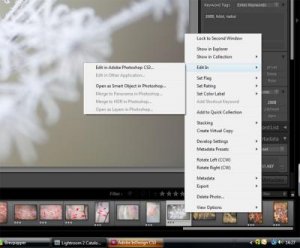
Nu har jag inte hunnit sätta mig in i de nya funktionerna ordentligt. Men högerklicka på bilden och välj open as smart object? (eller något sådant).
Tack Jeppe. Det där fungerar bra. Men det är fortfarande inte riktigt samma sak. Med smart object så måste jag själv spara ner psd filen i lämplig mapp. Jag tyckte att det var rätt praktiskt med den där "edit a copy" så att Lr fixar det åt mig.
Hur som helst så verkar det som att det inte längre går (rätta mig någon om jag har fel). Jag har försökt läsa hjälpen väldigt noggrant och så här säger den:
1. In the Library module or Develop module, select the photo you want to edit. Then, choose Photo > Edit In Adobe Photoshop or Edit In Adobe Photoshop Elements.
If you’re opening a camera raw file in Photoshop CS3 (10.0.1) or later, it opens directly.
2. (JPEG, TIFF, and PSD only) In the Edit Photo dialog box, select one of the following:
Edit A Copy With Lightroom Adjustments Applies any Lightroom adjustments you’ve made to a copy of the file and sends that file to Photoshop or Photoshop Elements for editing.
Note: Select Stack With Original to stack the edited photo with the original.
(JPEG, TIFF, and PSD only) Click Edit.
If you choose to edit a copy of the photo, Lightroom automatically adds the copy, with -Edit appended to the filename, to the catalog as you open it in Photoshop or Photoshop Elements.
Edit the photo as desired in Photoshop or Photoshop Elements.
Choose File > Save in Photoshop or Photoshop Elements.
Lightroom adds the newly saved photo to the catalog. Raw photos are added as TIFF files; JPEG, TIFF, and PSD photos are added in their original format.
Varför måste allting alltid ändras??? Jag blir så tekniktrött.